

Полезные командлеты Powershell для Exchange

Настройка IMAP для подключения пользователей

Включаем службы IMAP на сервере или если их несколько то на всех
Start-Service MSExchangeIMAP4; Start-Service MSExchangeIMAP4BE
Set-Service MSExchangeIMAP4 -StartupType Automatic; Set-Service MSExchangeIMAP4BE -StartupType Automatic

Смотрим что все ОК и запущено
Get-Service MSExchangeIMAP4; Get-Service MSExchangeIMAP4BE

Настройка для внешних и внутренних подключений
Set-ImapSettings -ExternalConnectionSettings "mail.domen.com:993:SSL","mail.domen.com:143:TLS" -X509CertificateName mail.domen.com
Set-ImapSettings -InternalConnectionSettings "mail.domen.com:993:SSL","mail.domen.com:143:TLS" -X509CertificateName mail.domen.com

Проверяем
Get-ImapSettings | Format-List *ConnectionSettings,*Bindings,X509CertificateName
Может понадобиться в контексте настройки:

Удалить ненужный сертификат по отпечатку
Remove-ExchangeCertificate -Thumbprint 760CB7FBB18461F4DEEDA60C266AB471A37FD354

Навесить нужный сертификат на службу
Enable-ExchangeCertificate -Thumbprint 760CB7FBB18461F4DEEDA60C266AB471A37FD35 -Services IMAP,IIS
 
Администрирование сервисов
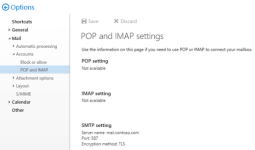
Настройка параметров SMTP с проверкой подлинности для клиентов POP3 и IMAP4 в Exchange Server

Чтобы настроить полное доменное имя для клиентов SMTP, прошедших проверку подлинности, используйте следующий синтаксис
Get-ReceiveConnector -Identity "Client Frontend*" | Set-ReceiveConnector -Fqdn mail.contoso.com

Проверяем
Get-ReceiveConnector -Identity "Client Frontend*" | Format-List Name,Fqdn

Чтобы указать сертификат, используемый для клиентских SMTP-подключений с проверкой подлинности, используйте следующий синтаксис:

$TLSCert = Get-ExchangeCertificate -Thumbprint 760CB7FBB18461F4DEEDA60C266AB471A37FD35
$TLSCertName = "<I>$($TLSCert.Issuer)<S>$($TLSCert.Subject)"
Get-ReceiveConnector -Identity "Client Frontend*" | Set-ReceiveConnector -TlsCertificateName $TLSCertName

Проверяем
Get-ReceiveConnector -Identity "Client Frontend*" | Format-List Name,Fqdn,TlsCertificateName

Публикуем
Get-ReceiveConnector -Identity "Client Frontend*" | Set-ReceiveConnector -AdvertiseClientSettings $true

11111116.png
 
Конвертировать pfx в pem, несколько примеров:

openssl pkcs12 -in certificatename.pfx -out certificatename.pem

Объединить сертификат .cer и закрытый ключ в PFX формат:
openssl pkcs12 -export -in certificatename.cer -inkey privateKey.key -out certificatename.pfx -certfile cacert.cer

openssl pkcs12 -inkey cert.pem -in certificate.cert -export -out BOB.pfx

openssl pkcs12 -export -in cert.pem -inkey privatekey -out output.pfx -name "*.domain.com"
 
Администрирование сервисов
Посмотреть параметры CAS - настройка службы autodiscover / автообнаружение

Get-ClientAccessService | fl Name,*URI*
 
Последнее редактирование:
Переименовать БД exchange server
Set-MailBoxDataBase 'Mailbox Database 0511774894' -Name 'MDB01'
Переместить БД на другой диск
Move-DatabasePath 'MDB01' -EdbFilePath 'E:\DB\MDB01\MDB01.edb' -LogFolderPath 'E:\DB\MDB01\LOGS'
Создание DAG
New-DatabaseAvailabilityGroup -Name DAG25 -WitnessServer server.domen.local -WitnessDirectory c:\store

Добавляем сервера - участников DAG
Add-DatabaseAvailabilityGroupServer -identity DAG25 -MailboxServer EX01
Add-DatabaseAvailabilityGroupServer -identity DAG25 -MailboxServer EX02
Add-DatabaseAvailabilityGroupServer -identity DAG25 -MailboxServer EX03

Найти свидетеля
Get-DatabaseAvailabilityGroup -Identity "DAG19" -Status | ft Name, Witness*,Servers

Включение цикличного ведения логов для БД
Get-MailBoxDatabase -Server EX01 | Set-MailBoxDatabase -CircularLoggingEnabled $true

Включить репликацию БД на другой сервер
Add-MailboxDatabaseCopy 'MDB01' -MailBoxServer 'EX02'

Отключить репликацию / копию
Remove-MailboxDatabaseCopy 'MDB02' -MailBoxServer 'EX01'

Проверить статус репликации
GetMailboxDatabaseStatus *

Посмотреть Email address policy
Get-EmailAddressPolicy | Format-List Name,Priority,Enabled*,RecipientFilterType,RecipientContainer,RecipientFilter,IncludedRecipients,Conditional*
 
  • Wow
Реакции: Surf_rider
Создать ящик для пользователей в конкретном OU
Get-User -OrganizationalUnit "OU=Sklad,OU=Users,OU=Company,DC=domen,DC=local" | Enable-Mailbox
 
Администрирование сервисов
Получить список групп рассылок, у которых открыто получение вне организации, вывод списка в файл
Код:
Get-DistributionGroup -ResultSize Unlimited | Where-Object { $_.RequireSenderAuthenticationEnabled -eq $false } | Select-Object Name,PrimarySmtpAddress,RequireSenderAuthenticationEnabled | Format-Table -AutoSize | Out-File C:\temp\DistributionGroup_with_external_senders.txt
 
  • Like
Реакции: Surf_rider
This is a configurable limit on the Transport Service in Exchange which is set by default to 20. You can view this setting by using the following command in Exchange Management Shell:
Get-TransportServer | FT Name,MaxOutboundConnections,MaxPerDomainOutboundConnections
To raise the limit of 20 concurrent connections to (for example) 50 concurrent connections you can use the Set-TransportServer command in EMS:
Get-TransportServer | Set-TransportServer -MaxPerDomainOutboundConnections 50
 
Увеличение размера вложения в ActiveSync / EWS / OWA
Запускать в cmd от имени админа

ActiveSync
Код:
%windir%\system32\inetsrv\appcmd.exe set config "Default Web Site/Microsoft-Server-ActiveSync/" -section:system.webServer/security/requestFiltering /requestLimits.maxAllowedContentLength:30000000
%windir%\system32\inetsrv\appcmd.exe set config "Default Web Site/Microsoft-Server-ActiveSync/" -section:system.web/httpRuntime /maxRequestLength:10240
%windir%\system32\inetsrv\appcmd.exe set config "Exchange Back End/Microsoft-Server-ActiveSync/" -section:system.webServer/security/requestFiltering /requestLimits.maxAllowedContentLength:30000000
%windir%\system32\inetsrv\appcmd.exe set config "Exchange Back End/Microsoft-Server-ActiveSync/" -section:system.web/httpRuntime /maxRequestLength:10240
%windir%\system32\inetsrv\appcmd.exe set config "Exchange Back End/Microsoft-Server-ActiveSync/" -section:appSettings /[key='MaxDocumentDataSize'].value:10240000

EWS
Код:
%windir%\system32\inetsrv\appcmd.exe set config "Default Web Site/ews/" -section:system.webServer/security/requestFiltering /requestLimits.maxAllowedContentLength:67108864
%windir%\system32\inetsrv\appcmd.exe set config "Exchange Back End/ews/" -section:system.webServer/security/requestFiltering /requestLimits.maxAllowedContentLength:67108864
%windir%\system32\inetsrv\appcmd.exe set config "Exchange Back End/ews/" -section:system.serviceModel/bindings /customBinding.[name='EWSAnonymousHttpsBinding'].httpsTransport.maxReceivedMessageSize:67108864
%windir%\system32\inetsrv\appcmd.exe set config "Exchange Back End/ews/" -section:system.serviceModel/bindings /customBinding.[name='EWSAnonymousHttpBinding'].httpTransport.maxReceivedMessageSize:67108864
%windir%\system32\inetsrv\appcmd.exe set config "Exchange Back End/ews/" -section:system.serviceModel/bindings /customBinding.[name='EWSBasicHttpsBinding'].httpsTransport.maxReceivedMessageSize:67108864
%windir%\system32\inetsrv\appcmd.exe set config "Exchange Back End/ews/" -section:system.serviceModel/bindings /customBinding.[name='EWSBasicHttpBinding'].httpTransport.maxReceivedMessageSize:67108864
%windir%\system32\inetsrv\appcmd.exe set config "Exchange Back End/ews/" -section:system.serviceModel/bindings /customBinding.[name='EWSNegotiateHttpsBinding'].httpsTransport.maxReceivedMessageSize:67108864
%windir%\system32\inetsrv\appcmd.exe set config "Exchange Back End/ews/" -section:system.serviceModel/bindings /customBinding.[name='EWSNegotiateHttpBinding'].httpTransport.maxReceivedMessageSize:67108864
%windir%\system32\inetsrv\appcmd.exe set config "Exchange Back End/ews/" -section:system.serviceModel/bindings /customBinding.[name='EWSWSSecurityHttpsBinding'].httpsTransport.maxReceivedMessageSize:67108864
%windir%\system32\inetsrv\appcmd.exe set config "Exchange Back End/ews/" -section:system.serviceModel/bindings /customBinding.[name='EWSWSSecurityHttpBinding'].httpTransport.maxReceivedMessageSize:67108864
%windir%\system32\inetsrv\appcmd.exe set config "Exchange Back End/ews/" -section:system.serviceModel/bindings /customBinding.[name='EWSWSSecuritySymmetricKeyHttpsBinding'].httpsTransport.maxReceivedMessageSize:67108864
%windir%\system32\inetsrv\appcmd.exe set config "Exchange Back End/ews/" -section:system.serviceModel/bindings /customBinding.[name='EWSWSSecuritySymmetricKeyHttpBinding'].httpTransport.maxReceivedMessageSize:67108864
%windir%\system32\inetsrv\appcmd.exe set config "Exchange Back End/ews/" -section:system.serviceModel/bindings /customBinding.[name='EWSWSSecurityX509CertHttpsBinding'].httpsTransport.maxReceivedMessageSize:67108864
%windir%\system32\inetsrv\appcmd.exe set config "Exchange Back End/ews/" -section:system.serviceModel/bindings /customBinding.[name='EWSWSSecurityX509CertHttpBinding'].httpTransport.maxReceivedMessageSize:67108864
%windir%\system32\inetsrv\appcmd.exe set config "Exchange Back End/ews/" -section:system.serviceModel/bindings /webHttpBinding.[name='EWSStreamingNegotiateHttpsBinding'].maxReceivedMessageSize:67108864
%windir%\system32\inetsrv\appcmd.exe set config "Exchange Back End/ews/" -section:system.serviceModel/bindings /webHttpBinding.[name='EWSStreamingNegotiateHttpBinding'].maxReceivedMessageSize:67108864

OWA
Код:
%windir%\system32\inetsrv\appcmd.exe set config "Default Web Site/owa/" -section:system.webServer/security/requestFiltering /requestLimits.maxAllowedContentLength:55000000
%windir%\system32\inetsrv\appcmd.exe set config "Default Web Site/owa/" -section:system.web/httpRuntime /maxRequestLength:55000
%windir%\system32\inetsrv\appcmd.exe set config "Exchange Back End/owa/" -section:system.webServer/security/requestFiltering /requestLimits.maxAllowedContentLength:55000000
%windir%\system32\inetsrv\appcmd.exe set config "Exchange Back End/owa/" -section:system.web/httpRuntime /maxRequestLength:55000
%windir%\system32\inetsrv\appcmd.exe set config "Exchange Back End/owa/" -section:system.serviceModel/bindings /webHttpBinding.[name='httpsBinding'].maxReceivedMessageSize:55000000
%windir%\system32\inetsrv\appcmd.exe set config "Exchange Back End/owa/" -section:system.serviceModel/bindings /webHttpBinding.[name='httpBinding'].maxReceivedMessageSize:55000000
%windir%\system32\inetsrv\appcmd.exe set config "Exchange Back End/owa/" -section:system.serviceModel/bindings /webHttpBinding.[name='httpsBinding'].readerQuotas.maxStringContentLength:55000000
%windir%\system32\inetsrv\appcmd.exe set config "Exchange Back End/owa/" -section:system.serviceModel/bindings /webHttpBinding.[name='httpBinding'].readerQuotas.maxStringContentLength:55000000
 
  • Like
Реакции: Surf_rider
Администрирование сервисов
Найденный на просторах интернета и модифицированный под себя, исходник тут
Отчет о размере почтовых ящиков

Код:
Add-PSSnapin Microsoft.Exchange.Management.PowerShell.SnapIn

$CSVPath = "$env:USERPROFILE\Desktop\MailboxSizeReport.csv" #путь сохранения csv отчета
$xlsxPath = "$env:USERPROFILE\Desktop\MailboxSizeReport.xlsx" #путь сохранения excel отчета

Remove-Item $CSVPath -ErrorAction SilentlyContinue
Remove-Item $xlsxPath -ErrorAction SilentlyContinue

$Report = [System.Collections.Generic.List[Object]]::new() #динамическая коллекция объектов для временного храниения результатов 

$AllMailbox = Get-Mailbox -ResultSize Unlimited -ErrorAction SilentlyContinue #получение всех почтовых яшщиков

$i = 0 #счетчк для прогресс статуса

foreach ($Mbx in $AllMailbox) {

  $Stats = Get-MailboxStatistics -Identity $Mbx.distinguishedname -WarningAction SilentlyContinue #получение статистики по каждому из найденных почтовых ящиков

    $ReportLine = [PSCustomObject]@{
        DisplayName                        = $mbx.DisplayName
        SamAccountName                     = $Mbx.SamAccountName
        RecipientType                      = $Mbx.RecipientTypeDetails
        PrimarySMTPAddress                 = $Mbx.PrimarySmtpAddress
        Database                           = $Mbx.Database
        ItemCount                          = $Stats.ItemCount
        TotalItemSize                      = $Stats.TotalItemSize
        UseDatabaseQuotaDefaults           = $Mbx.UseDatabaseQuotaDefaults
        MailboxWarningQuota                = $Mbx.IssueWarningQuota
        DeletedItemCount                   = $Stats.DeletedItemCount
        TotalDeletedItemSize               = $Stats.TotalDeletedItemSize
        LastLogonTime                      = $Stats.LastLogonTime
    }
    $Report.Add($ReportLine)

# Обновление счетчиков для отображения прогресса
    $i++
    Write-Progress -Activity "Сканирование почтовых ящиков..." -Status "Сканирование: $i of $($AllMailbox.Count)" -PercentComplete ($i / $AllMailbox.Count * 100) # прогресс
}

$Report | Sort-Object "TotalItemSize" -Descending | select -First 500 | Export-Csv -Path $CSVPath -NoTypeInformation -Encoding UTF8 # Экспорт в csv, выбор 500 самых больших ящиков

Или вывод сразу в удобочитаемом виде в excel таблицу, требуется установленный модуль ImportExcel, сам модуль

Код:
$Report | Sort-Object "TotalItemSize" -Descending | select -First 500 | Export-Excel -Path $xlsxPath -WorksheetName "MailboxSize" -AutoSize -FreezeTopRow -BoldTopRow

Отправка файла почтой

Код:
$encoding = [System.Text.Encoding]::UTF8
$mailparams = @{
        From = "адрес отправителя"
        To = "получатели"
        Subject = "Mailbox size report"
        Smtpserver = 'адрес почтового сервера'
        Port = "порт почтового сервера"
        Attachments = "путь до отправляемого файла"
        Encoding = $encoding
        Body = @"
<p style="color: black; font-weight: bold;font-size: 18px;"> Отчет о размере почтовых ящиков <br>
</p>
"@
 }

 Send-MailMessage @mailparams -BodyAsHtml
 
  • Like
Реакции: UEF и Surf_rider